Nobrand CM
- 商家
- Nobrand (引荐链接)
- 价格
- ¥19.8/月
- 配置
- 128Mbps / 100GB / 1C0.5G / 20G
Caution
结论:电信慎重购买
之前已经买了一个IX款,配了阿里云上海前置。今天买了一个CM款。
这两款大概是:
IX款:
客户端---自备大厂云---IX入口---IPLC---日本

CM款:
客户端---CM入口---IX入口---IPLC---日本
也就是说CM完全向下兼容IX,所以我不会继续续费IX款。
如下是CM入口—>苏州电信的tcp测速
iperf3
sea@seaDorm:~$ iperf3 -4 -c x.x.x.x -p xxxxx -R
Connecting to host x.x.x.x, port xxxxx
Reverse mode, remote host x.x.x.x is sending
[  5] local 198.18.0.1 port xxxxx connected to x.x.x.x port xxxxx
[ ID] Interval           Transfer     Bitrate
[  5]   0.00-1.00   sec  8.75 MBytes  73.3 Mbits/sec
[  5]   1.00-2.00   sec  11.8 MBytes  98.7 Mbits/sec
[  5]   2.00-3.00   sec  7.75 MBytes  65.0 Mbits/sec
[  5]   3.00-4.00   sec  7.00 MBytes  58.8 Mbits/sec
[  5]   4.00-5.00   sec  7.88 MBytes  66.1 Mbits/sec
[  5]   5.00-6.00   sec  7.25 MBytes  60.8 Mbits/sec
[  5]   6.00-7.00   sec  7.38 MBytes  61.9 Mbits/sec
[  5]   7.00-8.00   sec  8.12 MBytes  68.1 Mbits/sec
[  5]   8.00-9.00   sec  8.62 MBytes  72.4 Mbits/sec
[  5]   9.00-10.00  sec  9.38 MBytes  78.7 Mbits/sec
- - - - - - - - - - - - - - - - - - - - - - - - -
[ ID] Interval           Transfer     Bitrate         Retr
[  5]   0.00-10.02  sec  85.8 MBytes  71.8 Mbits/sec  201   sender
[  5]   0.00-10.00  sec  83.9 MBytes  70.4 Mbits/sec        receiver

iperf Done.由于我忠实于WG组网方案,不搞那些有的没的。所以如下是白天的udp测速,目前没有体验到qos的迹象(晚上重测已经体验到):
iperf3
sea@seaDorm:~$ iperf3 -4 -c x.x.x.x -p xxxxx -R -u -b 100M
Connecting to host x.x.x.x, port xxxxx
Reverse mode, remote host x.x.x.x is sending
[  5] local 198.18.0.1 port xxxxx connected to x.x.x.x port xxxxx
[ ID] Interval           Transfer     Bitrate         Jitter    Lost/Total Datagrams
[  5]   0.00-1.00   sec  11.9 MBytes   100 Mbits/sec  0.062 ms  0/8650 (0%)
[  5]   1.00-2.00   sec  11.9 MBytes   100 Mbits/sec  0.030 ms  0/8633 (0%)
[  5]   2.00-3.00   sec  11.9 MBytes   100 Mbits/sec  0.037 ms  0/8632 (0%)
[  5]   3.00-4.00   sec  11.9 MBytes   100 Mbits/sec  0.026 ms  0/8633 (0%)
[  5]   4.00-5.00   sec  11.9 MBytes   100 Mbits/sec  0.064 ms  0/8630 (0%)
[  5]   5.00-6.00   sec  11.9 MBytes   100 Mbits/sec  0.053 ms  0/8634 (0%)
[  5]   6.00-7.00   sec  11.9 MBytes   100 Mbits/sec  0.041 ms  0/8633 (0%)
[  5]   7.00-8.00   sec  11.9 MBytes   100 Mbits/sec  0.029 ms  0/8633 (0%)
[  5]   8.00-9.00   sec  11.9 MBytes   100 Mbits/sec  0.027 ms  0/8632 (0%)
[  5]   9.00-10.00  sec  11.9 MBytes   100 Mbits/sec  0.027 ms  0/8634 (0%)
- - - - - - - - - - - - - - - - - - - - - - - - -
[ ID] Interval           Transfer     Bitrate         Jitter    Lost/Total Datagrams
[  5]   0.00-10.02  sec   119 MBytes   100 Mbits/sec  0.000 ms  0/86509 (0%)  sender
[SUM]  0.0-10.0 sec  3 datagrams received out-of-order
[  5]   0.00-10.00  sec   119 MBytes   100 Mbits/sec  0.027 ms  0/86344 (0%)  receiver

iperf Done.
sea@seaDorm:~$ iperf3 -4 -c x.x.x.x -p xxxxx -u -b 50M
Connecting to host x.x.x.x, port xxxxx
[ 5] local 198.18.0.1 port xxxxx connected to x.x.x.x port xxxxx
[ ID] Interval Transfer Bitrate Total Datagrams
[ 5] 0.00-1.00 sec 5.97 MBytes 50.0 Mbits/sec 4321
[ 5] 1.00-2.00 sec 5.96 MBytes 50.0 Mbits/sec 4316
[ 5] 2.00-3.00 sec 5.96 MBytes 50.0 Mbits/sec 4316
[ 5] 3.00-4.00 sec 5.96 MBytes 50.0 Mbits/sec 4316
[ 5] 4.00-5.00 sec 5.96 MBytes 50.0 Mbits/sec 4317
[ 5] 5.00-6.00 sec 5.96 MBytes 50.0 Mbits/sec 4316
[ 5] 6.00-7.00 sec 5.96 MBytes 50.0 Mbits/sec 4316
[ 5] 7.00-8.00 sec 5.96 MBytes 50.0 Mbits/sec 4316
[ 5] 8.00-9.00 sec 5.96 MBytes 50.0 Mbits/sec 4317
[ 5] 9.00-10.00 sec 5.96 MBytes 50.0 Mbits/sec 4317
- - - - - - - - - - - - - - - - - - - - - - - - -
[ ID] Interval Transfer Bitrate Jitter Lost/Total Datagrams
[ 5] 0.00-10.00 sec 59.6 MBytes 50.0 Mbits/sec 0.000 ms 0/43168 (0%) sender
[ 5] 0.00-10.02 sec 59.6 MBytes 49.9 Mbits/sec 0.047 ms 0/43158 (0%) receiver
iperf Done.实际体验效果如下:


总之想要追求低延迟的话,不如考虑香港直连优化线路,或者用IX款。
另外,这个机器直接出口,ip质量还可以。如下是NQ。
######################################################################## IP质量体检报告:87.86.*.* https://github.com/xykt/IPQuality bash <(curl -sL https://Check.Place) -I 报告时间:2026-08-06 12:30:31 CST 脚本版本:v2026-03-29 ######################################################################## 一、基础信息(Maxmind 数据库) 自治系统号: AS11421 组织: HYW 坐标: °7′21″W, 51°29′47″N 地图: https://check.place/51.4964,-0.1224,15,cn 城市: N/A 使用地: [JP]日本, [EU]欧洲 注册地: [GB]英国 时区: Europe/London IP类型: 广播IP 二、IP类型属性 数据库: IPinfo ipregistry ipapi IP2Location AbuseIPDB 使用类型: 家宽 家宽 其他 机房 家宽 公司类型: 商业 家宽 其他 其他 三、风险评分 风险等级: IP2Location: 低风险 Scamalytics: 0低风险 ipapi: 0.00% AbuseIPDB: 0低风险 四、风险因子 库: IP2Location ipapi ipregistry IPQS Scamalytics ipdata IPinfo DB-IP 地区: [JP] 无 [JP] 无 [JP] [GB] [JP] 无 代理: 否 否 否 无 否 否 否 无 Tor: 否 否 否 无 否 否 否 无 VPN: 否 否 否 无 否 无 否 无 服务器: 是 是 否 无 否 否 否 无 滥用: 否 否 否 无 否 否 无 无 机器人: 否 无 无 无 否 无 无 无 五、流媒体及AI服务解锁检测 服务商: TikTok Disney+ Netflix Youtube AmazonPV Reddit ChatGPT 状态: 解锁 解锁 解锁 解锁 解锁 解锁 解锁 地区: [ALISG] [JP] [JP] [JP] [JP] [] [JP] 方式: 原生 原生 原生 原生 原生 原生 原生 六、邮局连通性及黑名单检测 本地25端口出站:阻断 通信:远端25端口不可达 IP地址黑名单数据库: 有效 439 正常 418 已标记 21 黑名单 0 ======================================================================== 今日IP检测量:1745;总检测量:1892953。感谢使用xy系列脚本! 报告链接:https://Report.Check.Place/ip/3GWC04FR5.svg
######################################################################## IP质量体检报告:2a14:7586:6114:*:*:*:*:* https://github.com/xykt/IPQuality bash <(curl -sL https://Check.Place) -I 报告时间:2026-08-06 12:30:31 CST 脚本版本:v2026-03-29 ######################################################################## 一、基础信息(Maxmind 数据库) 自治系统号: AS11421 组织: HYW 坐标: 9°5′14″E, 45°48′31″N 地图: https://check.place/45.8087,9.0872,15,cn 城市: Lombardy, 科莫, 22100 使用地: [JP]日本, [EU]欧洲 注册地: [US]美国 时区: Europe/Rome IP类型: 广播IP 二、IP类型属性 数据库: IPinfo ipregistry ipapi IP2Location AbuseIPDB 使用类型: 家宽 家宽 其他 商业 家宽 公司类型: 商业 家宽 其他 商业 三、风险评分 风险等级: IP2Location: 0低风险 Scamalytics: 0低风险 ipapi: 0.00% AbuseIPDB: 0低风险 四、风险因子 库: IP2Location ipapi ipregistry IPQS Scamalytics ipdata IPinfo DB-IP 地区: [IT] 无 [IT] 无 [JP] [IT] [JP] 无 代理: 否 否 否 无 否 否 否 无 Tor: 否 否 否 无 否 否 否 无 VPN: 否 否 否 无 否 无 否 无 服务器: 否 是 否 无 否 否 否 无 滥用: 否 否 否 无 否 否 无 无 机器人: 否 无 无 无 否 无 无 无 五、流媒体及AI服务解锁检测 服务商: TikTok Disney+ Netflix Youtube AmazonPV Reddit ChatGPT 状态: 失败 解锁 解锁 解锁 屏蔽 解锁 解锁 地区: [JP] [JP] [JP] [] [JP] 方式: 原生 原生 原生 原生 原生 六、邮局连通性及黑名单检测 本地25端口出站:阻断 通信:GmailOutlookYahooAppleQQMailRUAOLGMXMailCOM163SohuSina ======================================================================== 今日IP检测量:1751;总检测量:1892959。感谢使用xy系列脚本! 报告链接:https://Report.Check.Place/ip/3R3FQESSY.svg
好吧,到了晚上,我重新测试了一次。
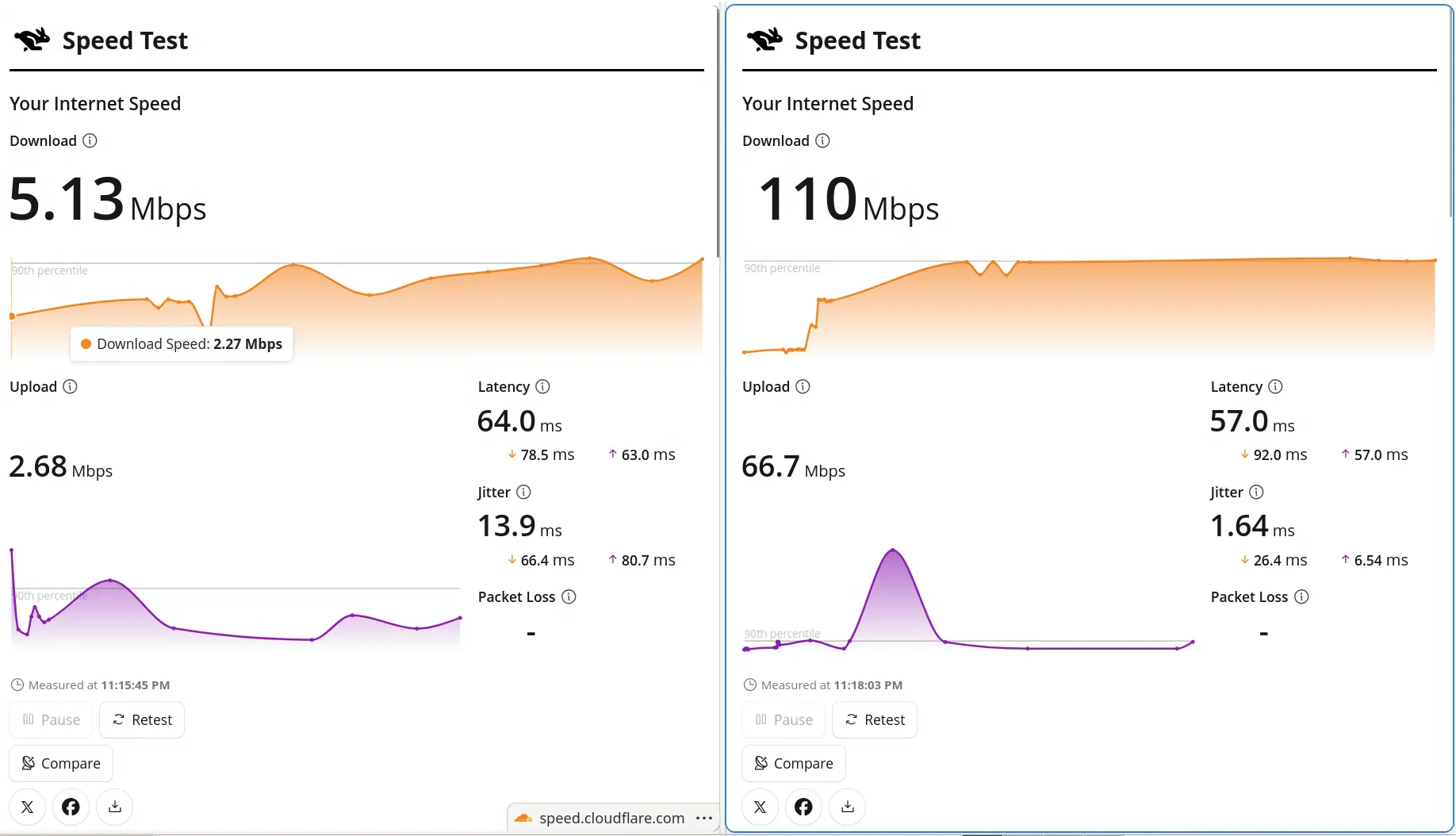
iperf3
sealee@seaDesktop:~$ iperf3 -4 -c x.x.x.x -p xxxxx -R
Connecting to host x.x.x.x, port xxxxx
Reverse mode, remote host x.x.x.x is sending
[  5] local 192.168.100.3 port xxxxx connected to x.x.x.x port xxxxx
[ ID] Interval           Transfer     Bitrate
[  5]   0.00-1.00   sec  1.50 MBytes  12.6 Mbits/sec
[  5]   1.00-2.00   sec   896 KBytes  7.34 Mbits/sec
[  5]   2.00-3.00   sec  1.25 MBytes  10.5 Mbits/sec
[  5]   3.00-4.00   sec  1.25 MBytes  10.5 Mbits/sec
[  5]   4.00-5.00   sec   640 KBytes  5.24 Mbits/sec
[  5]   5.00-6.00   sec   896 KBytes  7.34 Mbits/sec
[  5]   6.00-7.00   sec   640 KBytes  5.24 Mbits/sec
[  5]   7.00-8.00   sec  1.12 MBytes  9.44 Mbits/sec
[  5]   8.00-9.00   sec  2.00 MBytes  16.8 Mbits/sec
[  5]   9.00-10.00  sec  2.75 MBytes  23.1 Mbits/sec
- - - - - - - - - - - - - - - - - - - - - - - - -
[ ID] Interval           Transfer     Bitrate         Retr
[  5]   0.00-10.03  sec  13.4 MBytes  11.2 Mbits/sec  37   sender
[  5]   0.00-10.00  sec  12.9 MBytes  10.8 Mbits/sec       receiver

iperf Done.
sealee@seaDesktop:~$ iperf3 -4 -c x.x.x.x -p xxxxx
Connecting to host x.x.x.x, port xxxxx
[ 5] local 192.168.100.3 port xxxxx connected to x.x.x.x port xxxxx
[ ID] Interval Transfer Bitrate Retr Cwnd
[ 5] 0.00-1.00 sec 1.75 MBytes 14.7 Mbits/sec 92 8.44 KBytes
[ 5] 1.00-2.00 sec 384 KBytes 3.15 Mbits/sec 4 12.7 KBytes
[ 5] 2.00-3.00 sec 384 KBytes 3.15 Mbits/sec 3 16.9 KBytes
[ 5] 3.00-4.00 sec 256 KBytes 2.10 Mbits/sec 9 14.1 KBytes
[ 5] 4.00-5.00 sec 384 KBytes 3.15 Mbits/sec 5 11.2 KBytes
[ 5] 5.00-6.00 sec 640 KBytes 5.24 Mbits/sec 10 14.1 KBytes
[ 5] 6.00-7.00 sec 0.00 Bytes 0.00 bits/sec 10 7.03 KBytes
[ 5] 7.00-8.00 sec 256 KBytes 2.10 Mbits/sec 6 7.03 KBytes
[ 5] 8.00-9.00 sec 384 KBytes 3.15 Mbits/sec 1 21.1 KBytes
[ 5] 9.00-10.00 sec 512 KBytes 4.19 Mbits/sec 7 8.44 KBytes
- - - - - - - - - - - - - - - - - - - - - - - - -
[ ID] Interval Transfer Bitrate Retr
[ 5] 0.00-10.00 sec 4.88 MBytes 4.09 Mbits/sec 147 sender
[ 5] 0.00-10.03 sec 4.12 MBytes 3.45 Mbits/sec receiver
iperf Done. iperf3
sealee@seaDesktop:~$ iperf3 -4 -c x.x.x.x -p xxxxx -R -u -b 50M
Connecting to host x.x.x.x, port xxxxx
Reverse mode, remote host x.x.x.x is sending
[  5] local 192.168.100.3 port xxxxx connected to x.x.x.x port xxxxx
[ ID] Interval           Transfer     Bitrate         Jitter    Lost/Total Datagrams
[  5]   0.00-1.00   sec   582 KBytes  4.77 Mbits/sec  2.418 ms  29/443 (6.5%)
[  5]   1.00-2.00   sec   575 KBytes  4.71 Mbits/sec  2.079 ms  89/498 (18%)
[  5]   2.00-3.00   sec  2.08 MBytes  17.5 Mbits/sec  1.237 ms  2057/3572 (58%)
[  5]   3.00-4.00   sec   790 KBytes  6.47 Mbits/sec  1.634 ms  3661/4223 (87%)
[  5]   4.00-5.00   sec   862 KBytes  7.06 Mbits/sec  2.134 ms  3207/3820 (84%)
[  5]   5.00-6.00   sec   712 KBytes  5.83 Mbits/sec  2.890 ms  4380/4886 (90%)
[  5]   6.00-7.00   sec   840 KBytes  6.88 Mbits/sec  1.149 ms  2959/3556 (83%)
[  5]   7.00-8.00   sec  1.92 MBytes  16.1 Mbits/sec  1.867 ms  2771/4166 (67%)
[  5]   8.00-9.00   sec  2.23 MBytes  18.7 Mbits/sec  1.280 ms  3504/5129 (68%)
[  5]   9.00-10.00  sec  1011 KBytes  8.28 Mbits/sec  0.691 ms  3271/3990 (82%)
- - - - - - - - - - - - - - - - - - - - - - - - -
[ ID] Interval           Transfer     Bitrate         Jitter    Lost/Total Datagrams
[  5]   0.00-10.03  sec  59.8 MBytes  50.0 Mbits/sec  0.000 ms  0/43518 (0%)  sender
[SUM]  0.0-10.0 sec  1 datagrams received out-of-order
[  5]   0.00-10.00  sec  11.5 MBytes  9.62 Mbits/sec  0.691 ms  25928/34283 (76%)  receiver

iperf Done.